


You bought the fingerprint terminals. They work. Staff tap in, the machine beeps, and the attendance is sitting right there on the device. Now you want that data in your own system — a dashboard, a payroll run, an HR platform someone built for you — and you discover the data is trapped.
This is the wall almost every "connect our biometric machine to our software" project hits, and it is not a small one. It is the reason so many companies still have somebody exporting a file from a machine by the staff entrance once a month.
This post is the engineering companion to my Codech HR case study. That page covers what the system does for the business. This one is about the specific problem of getting punches off the hardware, and what I would tell you if you were about to attempt it.
Why your cloud app cannot just read the device
Two reasons, and either one on its own is fatal.
The terminal has a private address. Your ZKTeco device sits on the office LAN on something like 192.168.1.201. That address means nothing outside your building. A server on the internet has no route to it. There is no DNS entry, no public IP, nothing to connect to.
It speaks a raw socket protocol, not HTTP. ZKTeco terminals talk on TCP/UDP port 4370 using their own binary protocol. This is not a REST API. There is no JSON, no bearer token, no OpenAPI spec. And if your application is serverless — a Next.js app on Vercel, a Lambda, a Cloud Function — you cannot hold that kind of long-lived socket connection open even if the address were reachable.
So the instinct — "our app will connect to the device and pull the logs" — is dead on arrival. The connection has to originate inside your network and go outward.
Once you accept that, the design gets much simpler.
The three ways people try to solve this
Manual export. Somebody walks to the machine, exports to a USB stick or a .dat file, and uploads it. This works, technically. It also means your attendance data is only as fresh as the last person who remembered, and it puts a human in the path of payroll. Every company doing this is one holiday away from a bad month.
A Windows PC running the vendor's software. ZKTeco ship desktop software and an SDK. You install it on an office PC, it pulls from the device, and then you try to get data out of that into your system — usually by reading its database directly or exporting on a schedule. It works, but you have now taken a dependency on a Windows machine, a vendor application, and its database schema. Three things you do not control, in a room you do not visit.
A small agent you write yourself. A program that runs on any always-on machine inside the office, reads the terminal locally, and pushes punches out over HTTPS to your API. This is the one I would recommend, and it is what I built.
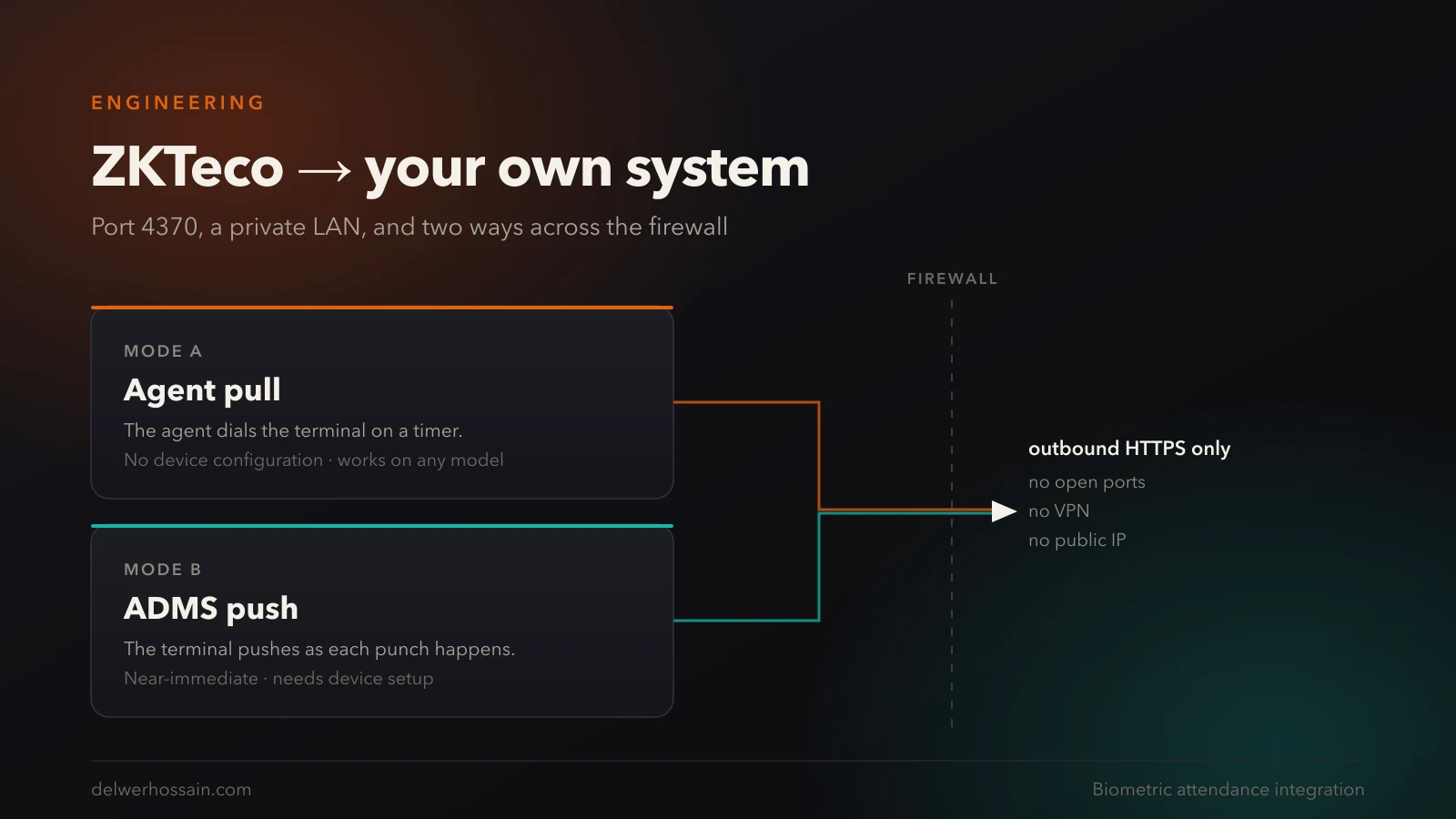
The agent approach wins because it inverts the direction of the connection. Nothing from the internet has to reach into your network. There is no port forwarding, no VPN, no firewall exception, no static public IP. The agent makes outbound HTTPS calls, which every office network already allows.
Agent pull or ADMS push — which should you use?
ZKTeco devices support two quite different ways of moving data, and most write-ups only mention one. You want to know about both, because the right answer depends on the site.
Agent pull. Your agent opens a connection to the terminal on port 4370, asks for attendance logs, and gets them. You control the interval — every five minutes is a sensible default. It works with essentially any ZKTeco device, and it needs zero configuration on the terminal itself. If someone hands you a device that is already mounted, wired and enrolled, pull works immediately.
ADMS push (sometimes labelled "Cloud Server" or "ADMS" in the device menu). The terminal itself pushes punches to an HTTP endpoint as they happen. You point the device at a listener, and it does the work. This gives you near-real-time attendance instead of a polling delay.
The trade-off is straightforward:
| Agent pull | ADMS push | |
|---|---|---|
| Device configuration | None | Required, per device |
| Latency | Up to your poll interval | Near-immediate |
| Works on older/basic models | Almost always | Not always |
| If the agent is down | Catches up on next run | Pushes may be lost unless something is listening |
| Debugging | You control when it happens | You wait for a punch |
My recommendation: build for pull, support push. Pull is what gets a site working on day one without anyone touching the hardware menus. Push is the upgrade you offer when a client wants live attendance on a wall display and has a device that supports it.
Critically, make this a per-device database setting, not a deployment decision. In my build it is a single enum on the device record — AGENT_PULL, DEVICE_PUSH, or neither. Switching a site from one mode to the other is a dropdown, not a release. You will regret hard-coding this the first time a client has three devices and one of them is an older model.
Note that push still needs the agent. The device is pushing to a listener on the LAN, and something has to forward that to your cloud API. The agent is that something in both modes — it just changes which end starts the conversation.
Do you need the Windows SDK?
No. This is worth saying plainly, because it is the assumption that pushes teams towards a Windows box they did not want.
The ZKTeco protocol has been implemented in open libraries for most ecosystems — Node, Python, PHP, Go. My agent is plain JavaScript on Node with exactly one runtime dependency for the protocol itself. That is deliberate: the program runs unattended on a client's office PC for years, on a machine nobody administers, and every dependency you add is a future breakage you will have to travel to fix.
It also means the agent runs on Windows or Linux, which matters more than it sounds. Plenty of offices have a small Linux box, a Raspberry Pi, or an existing server that is already on 24/7. Not needing Windows means not buying a machine.
Prove the connection before you write any sync code
The single most useful thing I built was not the sync. It was a probe command.
It connects to the terminal, prints how many users and how many logs the machine is holding, shows the last few punches, and changes nothing. It is the mandatory first step of every install.
The reason is simple: if you go straight to writing sync logic, your first run conflates a dozen possible failures. Wrong IP? Wrong port? Device on a different VLAN? Protocol mismatch? Empty device? A read-only probe separates "can I talk to this machine at all" from "is my sync logic correct", and it turns a frustrating afternoon into a two-minute check.
Two failures cover almost everything you will hit on site:
- Connection timed out — wrong IP address, or the PC is on a different subnet or VLAN from the terminal.
- Connection refused — wrong port. It is almost always
4370.
What the agent has to get right
Reading punches is the easy part. Not losing them, and not double-counting them, is the actual work. Four things matter.
A cursor that only advances on confirmation. Send punches in batches, oldest first, and keep a position marker on disk. Advance it only after the server confirms the batch — never before. If the connection dies mid-send, the marker still points at the last confirmed position and the next run resumes from there.
Re-send when unsure, never skip. When the agent cannot tell whether a batch landed, it should send again. This is only safe if your ingest endpoint is idempotent — which it must be anyway (see below). The asymmetry is the point: a duplicate costs nothing if the server refuses it, while a skipped punch costs somebody a day's pay.
Exponential backoff on failure. Start around 30 seconds, cap at about five minutes. A terminal switched off overnight should not spend eight hours hammering the office network and your API.
A heartbeat even when there is nothing to send. If the agent posts nothing on a quiet day, your server cannot distinguish "no punches yet" from "the office PC died". Send an empty batch anyway. Without this, silence is ambiguous — and an ambiguous silence in an attendance system eventually gets read as "everybody was absent".
The mistakes that cost you a payroll cycle
Getting the data across is maybe half the project. These are the ones that bite later.
Duplicate punches are a money bug. People tap twice. They tap, hear nothing, tap again. At shift change with thirty people queuing, this happens constantly. Defend in layers: a database unique constraint on the natural key (organisation, device, biometric id, timestamp, punch type), bulk inserts that skip duplicates rather than failing the batch, and a configurable time window that collapses near-identical taps. Make that window govern every entry path — terminal and web check-in both — or the two will drift apart and you will only find out during a payroll dispute.
Store raw punches immutably. Never edit or delete them. Derive everything downstream. When a calculation turns out to be wrong — and it will — you want to re-run it against the original evidence, not against a previously corrected guess.
Decide which day an overnight shift belongs to. A porter clocking in at 22:00 Tuesday and out at 06:00 Wednesday worked Tuesday's shift. Credit the punch to the business date the shift started, with a grace period after the scheduled end so a late exit still lands on the right day. Get this wrong and every night-shift employee looks half absent, on every report, invisibly.
Do not trust a device status flag. A device should read Online only if an agent has reported for it recently — derive staleness at read time from the device's own sync interval. A stored flag that someone forgot to clear means an operations team finds a dead terminal showing green, and after that they stop trusting the screen entirely.
One biometric id per person, across every device. If the same employee is enrolled as 105 on the gate and 205 in the restaurant, you need a mapping table and your dedup logic gets considerably harder. If you are starting fresh, standardise the id across all terminals now. It costs nothing today and a migration later.
What it looks like end to end
Fingerprint terminal ──4370──┐
   (192.168.1.201)           ├─► Agent (office PC) ──HTTPS──► Your API
Fingerprint terminal ──ADMS──┘        cursor + retry            (idempotent)
That is the whole architecture. An agent inside the LAN, speaking the device protocol locally and HTTPS outward, with a cursor that guarantees nothing is lost and an ingest endpoint that guarantees nothing is counted twice.
Everything else — shifts, rosters, leave, payroll — sits on top of the punch table and is ordinary application work.
FAQ
Can I connect a ZKTeco device to my system without opening a port on the firewall?
Yes, and you should. The agent runs inside your network and only makes outbound HTTPS calls, so there is nothing to forward and no inbound rule to add. If a proposed integration asks you to expose port 4370 to the internet, push back — that is putting an unauthenticated binary protocol on the public internet.
Does the device need a static IP address?
It needs a stable address on the local network, which in practice means a DHCP reservation rather than a true static IP. More importantly, treat the device's serial number as its real identity in your database, not its IP. Addresses move; serials do not.
What happens to attendance if the internet goes down?
Punches stay on the terminal, which is the safest place for them. The agent catches up when connectivity returns, sending oldest-first from its last confirmed position. Staff notice nothing. This is exactly why the cursor-and-resend design matters more than making the sync fast.
How real-time can attendance be?
With ADMS push, effectively immediate. With agent pull, it is your poll interval — five minutes is a reasonable default that keeps both the device and your API comfortable. Be honest with yourself about whether you need faster: for payroll, five minutes and five seconds are identical. For a live "who is in the building" board, push is worth the device configuration.
Can one system handle several offices or companies?
Yes, but decide early. Scope every record to an organisation from the first migration, make the biometric id unique within a company rather than globally, and run one agent per site. Retrofitting multi-tenancy after real data exists is one of the more expensive things you can do to yourself.
Should I build this or buy an off-the-shelf HR system?
Buy, if your shifts are simple and standard software fits. Build when the fit fails — rotating rosters, overnight shifts, multiple properties, payroll rules specific to your jurisdiction, or an existing system you need this to feed. The integration described here is the same work either way; what changes is how much sits on top of it.
Next step
If you have terminals on one side of a firewall and a system on the other, that gap is a solved problem — the design above is the shape of the solution, and the Codech HR case study shows it running against a real shift workforce.
If you would rather not build it yourself, tell me what hardware you run and how your shifts are structured. A fixed-price proof of concept against a single terminal is usually the sensible way to find out whether the rest is worth doing.