


Getting Biometric Attendance From an Office LAN Into a Cloud HR System
A hotel and resort group’s fingerprint terminals sat on a private office network with no route to the internet. Codech HR reads them anyway — and turns the punches into an attendance record that survives night shifts, daylight saving and double taps.
Last updated 19 August 2026
Codech HR is a multi-tenant HR and attendance platform for shift workforces. ZKTeco fingerprint terminals sit on a private office LAN that no cloud server can reach, so a small on-site agent bridges them over HTTPS — feeding an attendance engine that handles overnight shifts, daylight-saving boundaries and duplicate punches.
- What it does — punches from ZKTeco terminals on a private office LAN reach a cloud HR platform on their own, in both transport modes the hardware supports, with nobody exporting a spreadsheet.
- What it prevents — a double tap cannot inflate a payslip and a dropped connection cannot lose a day’s work, because the agent re-sends when it is unsure and the database refuses the repeat.
- What it gets right — a night shift ending at 06:00 is credited to the day it started, and moving someone onto a new roster today does not rewrite last month’s timesheet.
- Role
- Lead developer and architect — database schema, backend services, attendance engine, device agent and admin interface. 240 of the repository’s 244 commits.
- Client
- A hotel and resort group running multiple properties, with front office, housekeeping, kitchen and security staff on rotating shifts. Not named here.
- Build
- 13 calendar days from first commit to a deployed platform — 30 July to 11 August 2026.
- Status
- In development — deployed to a production environment, not yet in general use.
- Product model
- Multi-tenant — built to be sold per client business, with payroll as a separately licensed module rather than a fork.
- Application stack
- Next.js 16, React 19, TypeScript, Prisma 7, MariaDB, Tailwind 4, shadcn/ui.
- Device agent
- Node.js CLI on an office PC — 291 lines, one runtime dependency, speaking the ZKTeco socket protocol on port 4370.
- Hosting
- Vercel, plus a portable Docker target for clients whose policy requires self-hosting.
- Where I work from
- Chattogram, Bangladesh. Working hours overlap the European and Gulf working day.
Every figure below is counted from shipped code or produced by running the test suite. This build carries no production telemetry, so none of these are performance, uptime or scale claims — see the note at the foot of the page.
- First commit to deployed platform13 days30 July to 11 August 2026, measured from git history — 227 commits across 86 merged pull requests.
- Tests passing, and how long they take1,863 in 4.9sProduced by running the suite on 18 August 2026 across 166 test files — not a coverage estimate, and not a performance benchmark of the application.
- Layers of duplicate-punch defence3Counted from shipped code: two database unique constraints, an administrator-set time window governing both entry paths, and a sync cursor that only advances on confirmation.
- Runtime dependencies in the on-site device agent1The agent is 291 lines of plain JavaScript. It runs unattended on a client’s office PC for years, where every added dependency is a future breakage on a machine nobody administers.
- Tiers resolved when deciding which shift applies4Counted from shipped code: a one-day override, then a date-ranged roster assignment, then the employee’s default shift, then the organisation default.
- Database models behind the domain34Counted from the Prisma schema — 34 models and 30 enums with 102 indexes, versioned across 12 migrations.
Every screen below is a demonstration workspace. The people, salaries, offices and device addresses in these screenshots are seeded sample data generated for walkthroughs and testing — no real employee’s name, pay or attendance record appears anywhere on this page, and no client’s live system is shown.
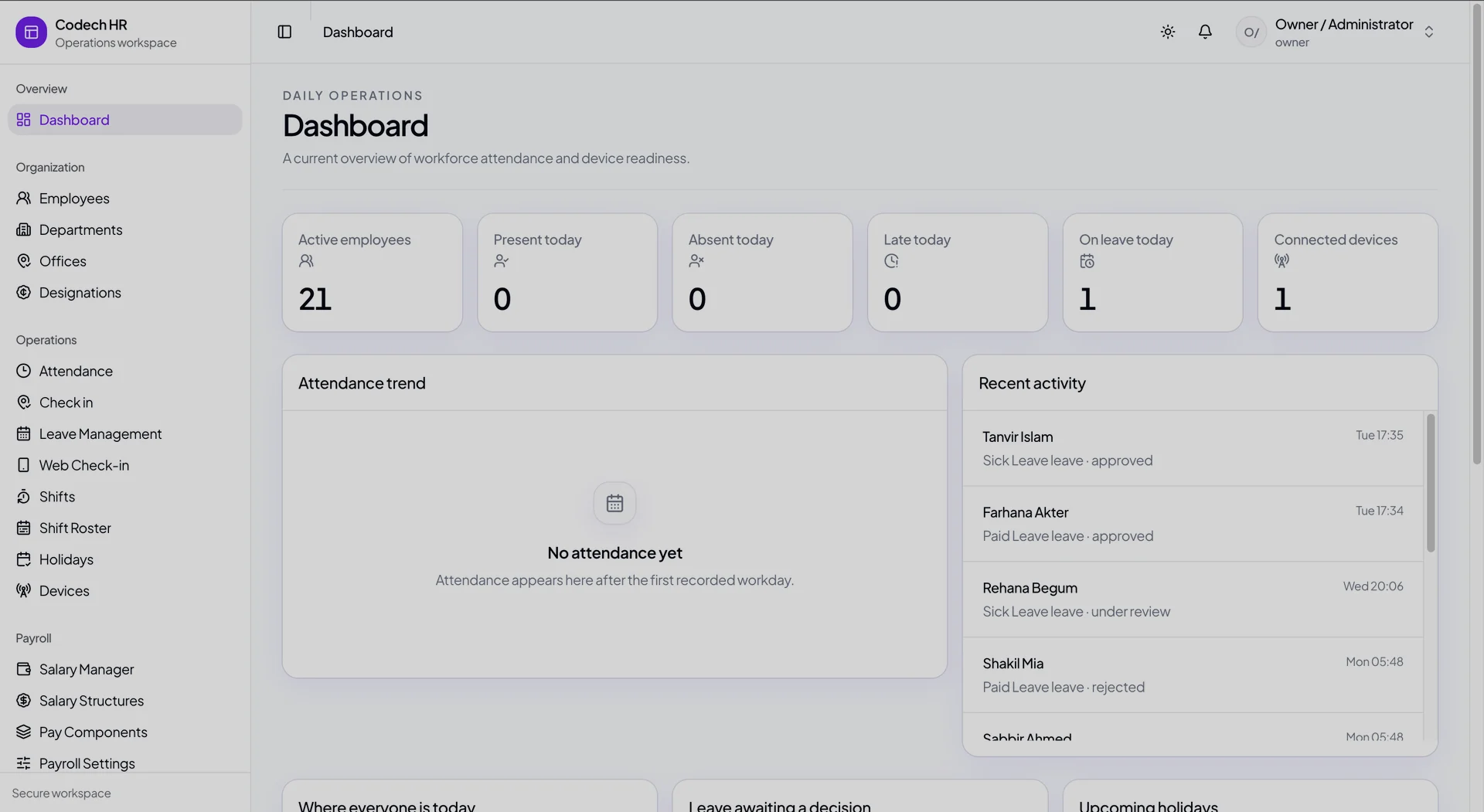
The daily operations view. The attendance panel is empty because this workspace has no punches for the day — it says so, rather than drawing a plausible-looking chart from nothing.
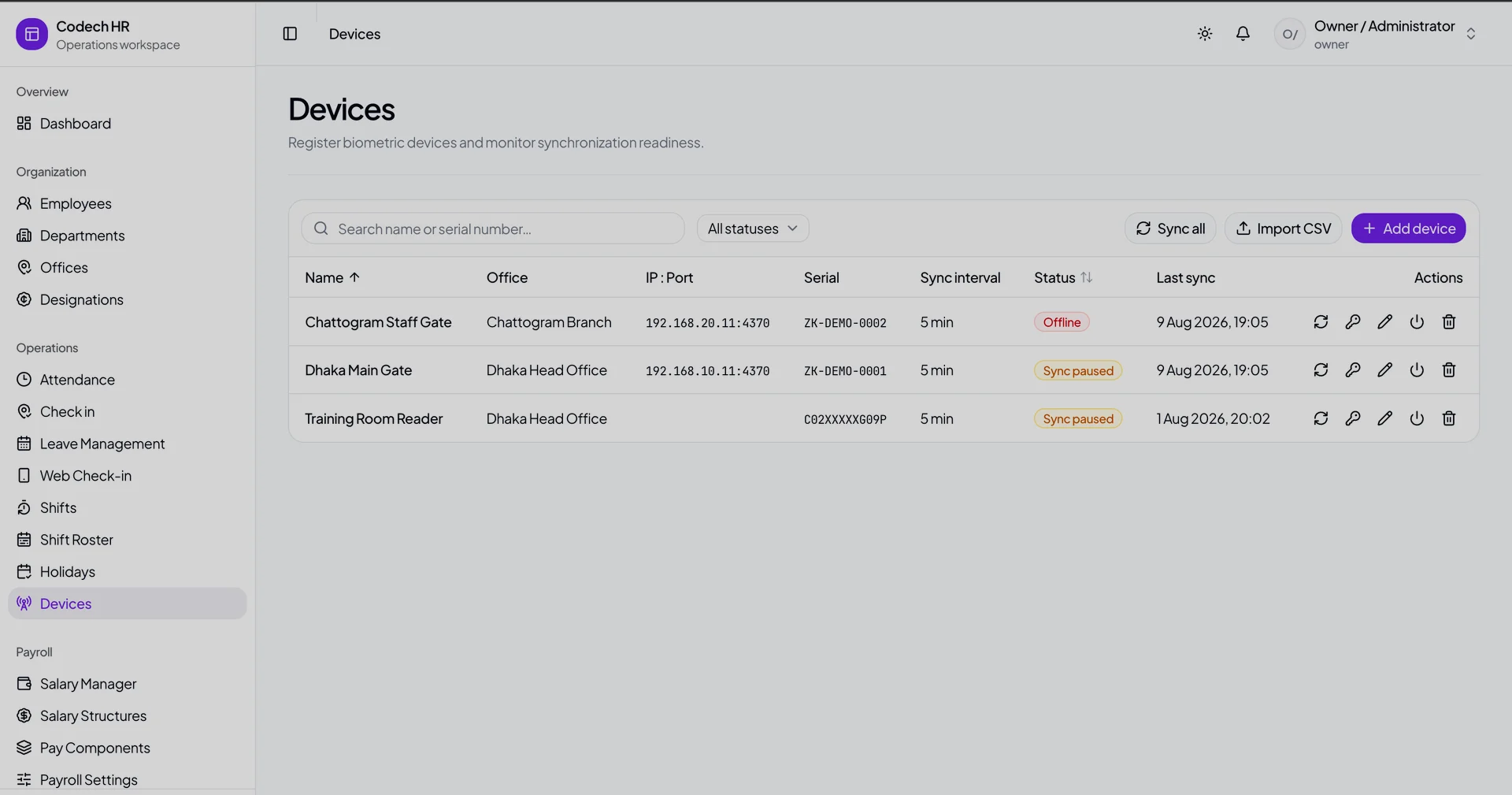
Registered terminals, each with its own sync interval and last-sync time. A device reads Online only when an agent has reported for it recently — all three here are offline or paused, and the screen states it plainly.
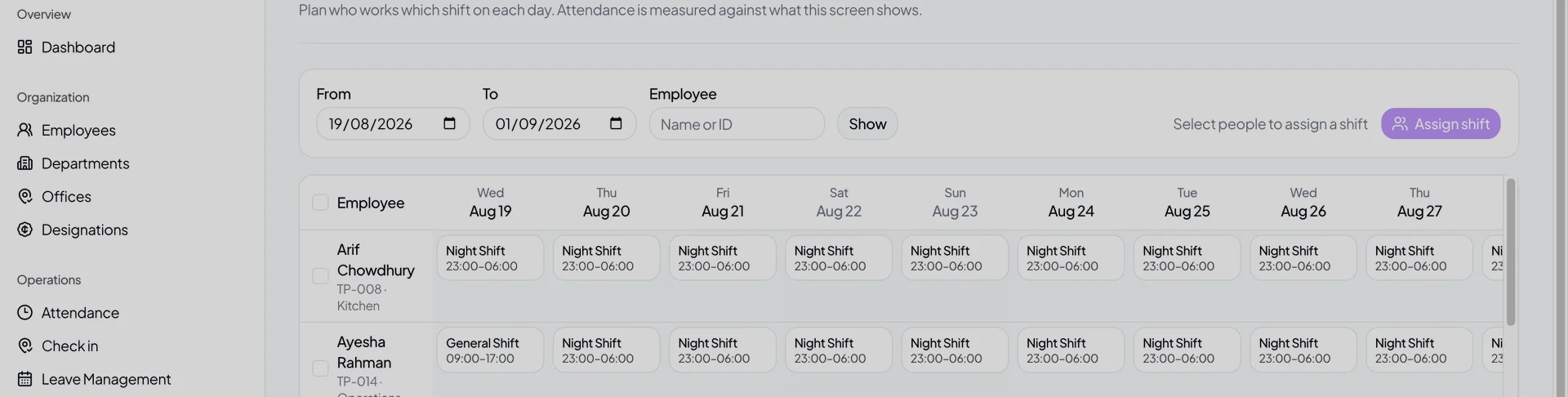
Who works which shift on each day. The second row changes from General to Night part-way through the week: assignments are effective-dated, so re-running an earlier month resolves that month’s roster rather than today’s.
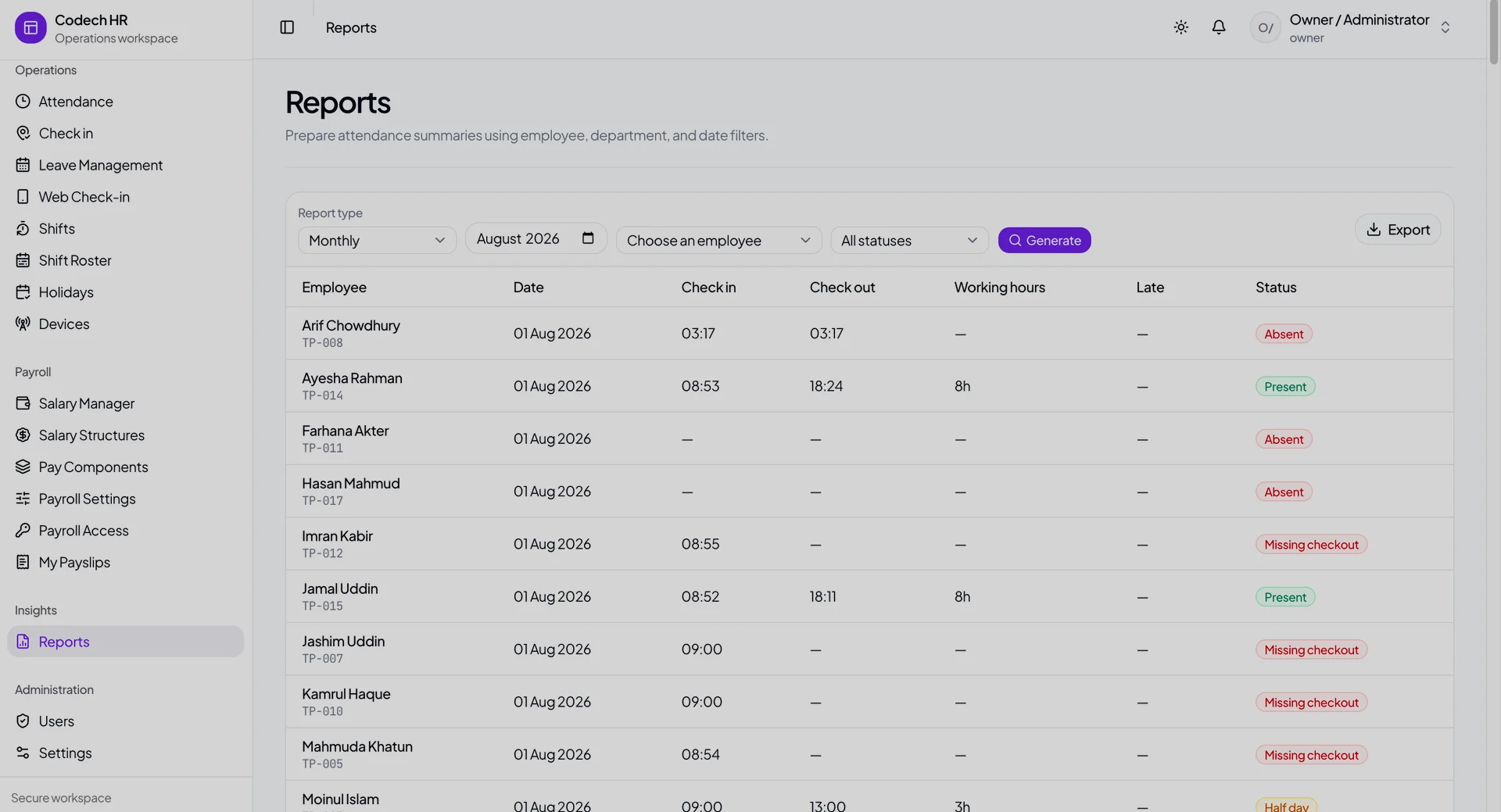
Monthly attendance with the engine’s own verdicts — Present, Absent, Missing checkout, Half day — derived from raw punches rather than typed in by a manager.
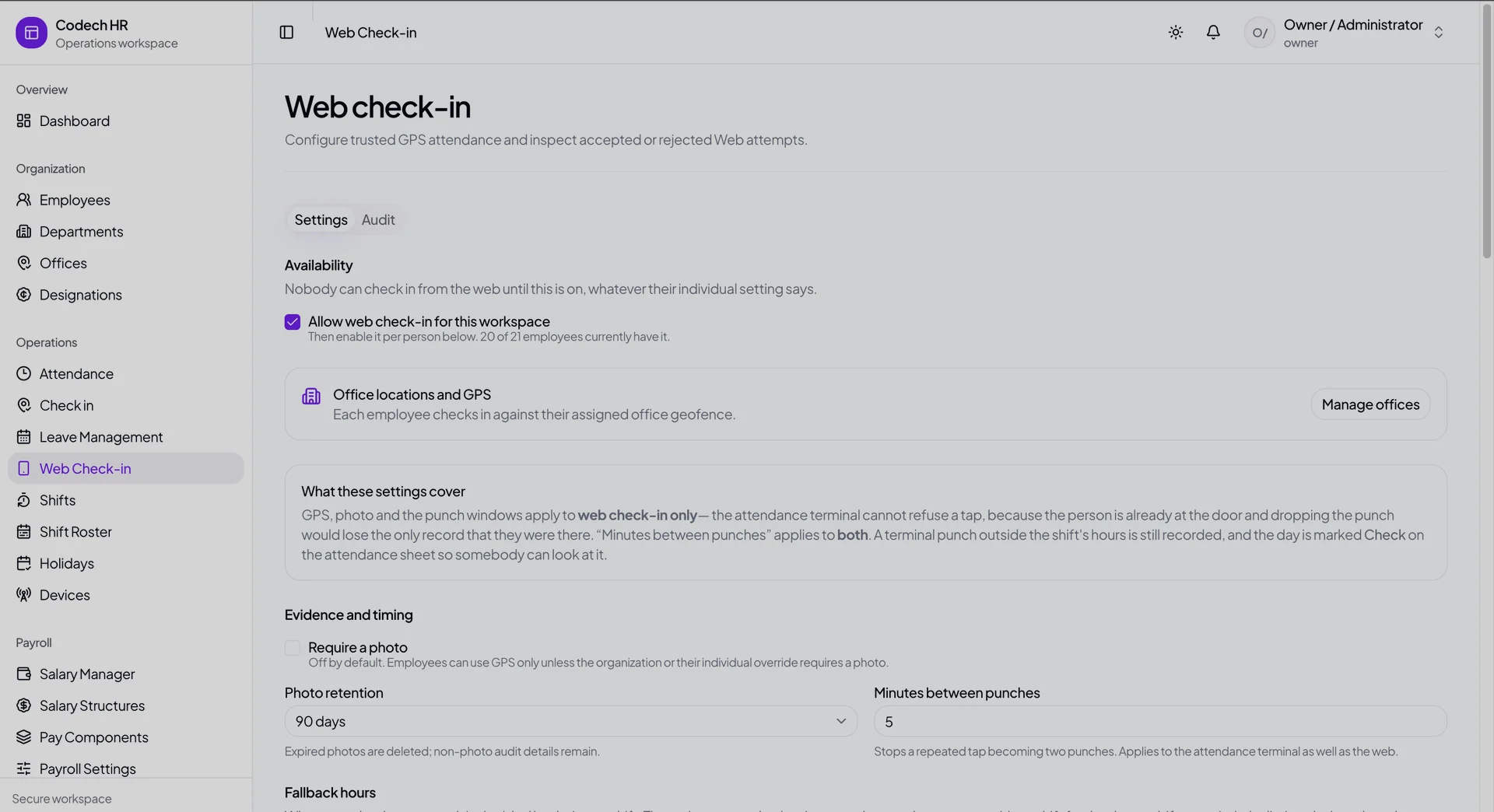
The web check-in policy. One dedup window governs both the web path and the terminal, photo retention is bounded at 90 days, and the panel is explicit that a terminal cannot refuse a tap the way the web can.
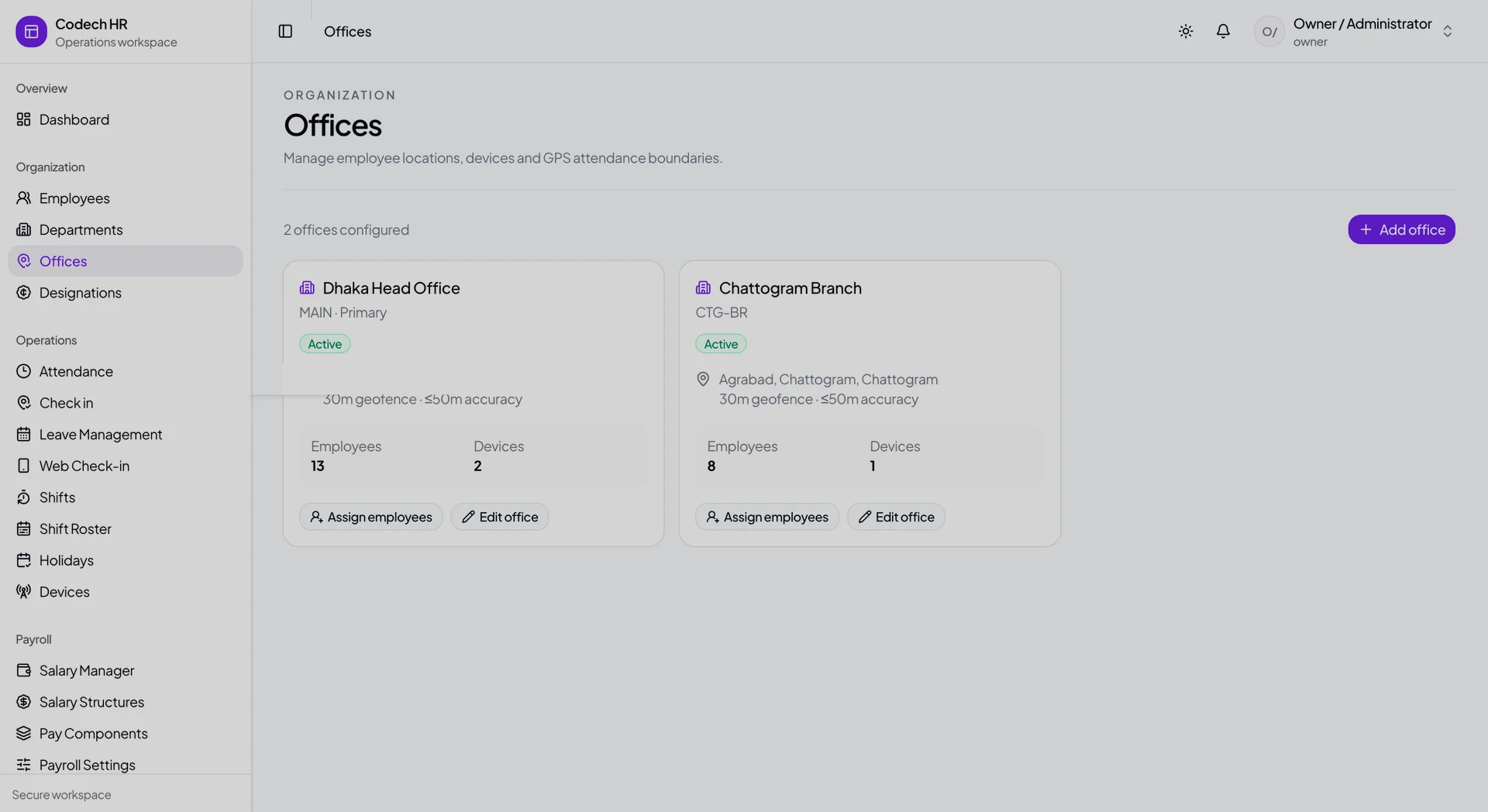
Each office carries its own GPS geofence and accuracy ceiling, which web check-ins are validated against. The street address is removed here; it is not needed to show the mechanism.
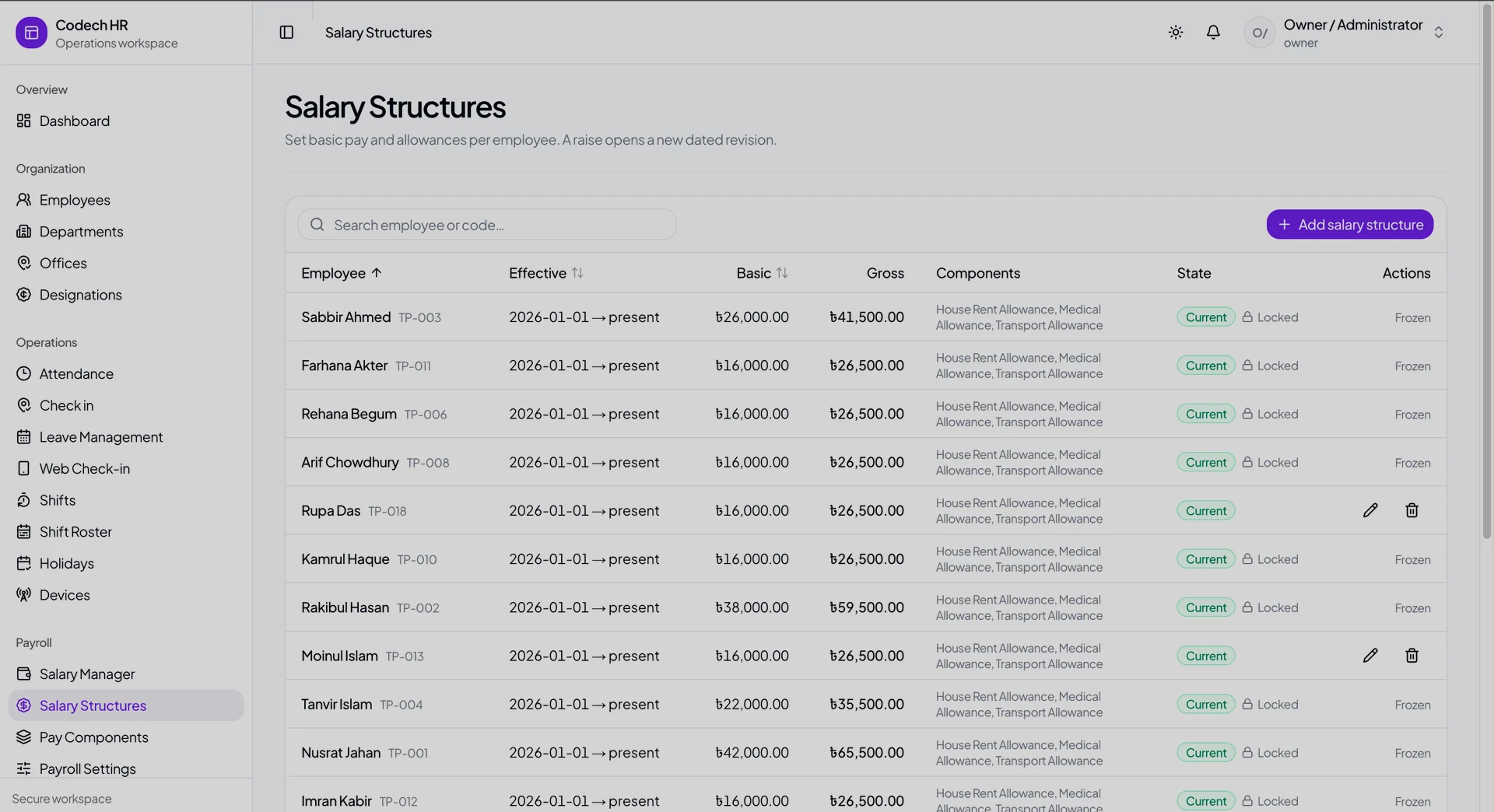
Basic pay and allowances per employee, held as dated revisions — a raise opens a new one rather than overwriting the last. Rows attached to an approved payroll run show as locked.
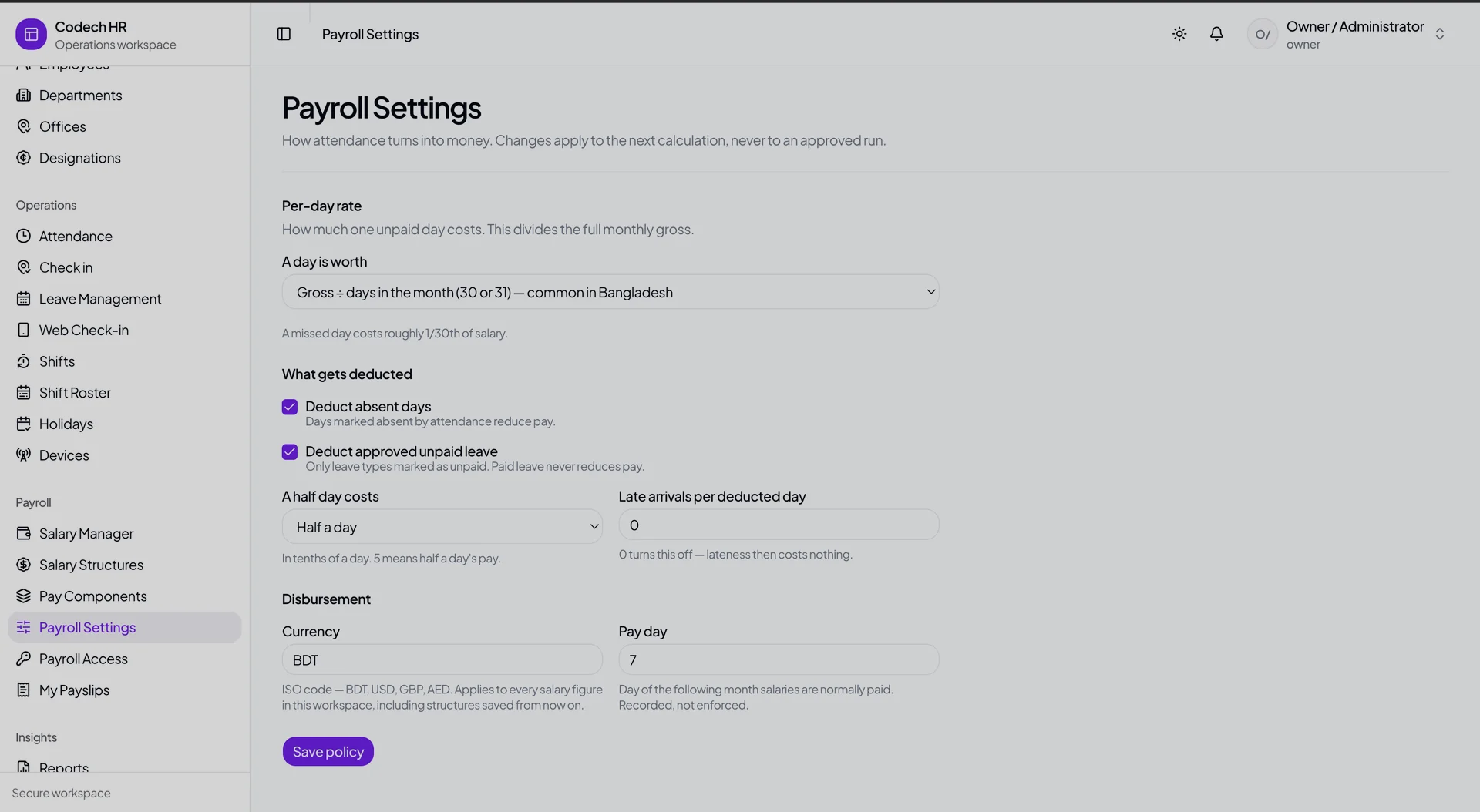
How attendance becomes money: the per-day basis, what is deducted, and the disbursement currency. Changes apply to the next calculation and never to an approved run.
The problem: the clocks were on the wrong side of the firewall
A hotel runs on shifts. Front office, housekeeping, kitchen, security — people arriving at 06:00, at 14:00, at 22:00, some of them clocking out on a different calendar day from the one they clocked into. Attendance is not an HR formality there. It is the input to payroll.
The client already had the hardware: ZKTeco fingerprint terminals, mounted by the staff entrance, working fine. What they did not have was anything to do with the data. Someone exported it, someone re-keyed it into a spreadsheet, and once a month someone reconciled that spreadsheet against a roster that had changed twice since.
The obvious fix is a cloud HR system. The obvious fix does not work, for a reason that kills most of these projects before they start: the terminals are unreachable. A ZKTeco device sits on the office LAN with a private address like 192.168.1.201 and speaks a raw socket protocol on port 4370. A server on the internet has no route to that address. A serverless function cannot hold that socket open even if it did.
That is the wall. This page is mostly about how the system gets over it, and what it does with the punches once they arrive.
How do you get attendance off a device that has no route to the internet?
You stop trying to reach in, and you push out instead.
zk-agent is a small command-line program that runs on a PC in the office — the same network as the terminals, on whatever machine already stays switched on. It reads punches locally and forwards them over HTTPS to the application.
K50-A ──4370──┐
              ├─► ZK Agent (office PC) ──HTTPS──► Codech HR
K50-A ──ADMS──┘
It is 291 lines of plain JavaScript with exactly one runtime dependency. That is a deliberate constraint, not a boast. This program runs unattended on a client's office PC, on a machine nobody administers, for years. Every dependency is a future breakage on a computer I cannot see.
It supports both transports the hardware offers, because different sites need different ones:
AGENT_PULL— the agent dials the terminal on an interval, default 300 seconds. Works with any device, needs no device configuration.DEVICE_PUSH— the agent runs a small HTTP listener on the LAN and accepts the terminal's own ADMS ("Cloud Server") pushes, then forwards them. Lower latency, but the device has to be configured for it.
The mode is a per-device setting in the database, not a deployment decision, so switching a site from one to the other is a dropdown.
There is one more command, and it matters more than it looks: probe. It connects to the terminal, prints how many users and logs the machine is holding and the last few punches, and changes nothing. It is the mandatory first step of every install, because the alternative is discovering a wrong IP address at the same moment you discover a mangled sync. The README pairs it with a symptom-to-cause table for the two failures that account for almost all of them: a timeout means the wrong IP or a different subnet, a refusal means the wrong port.
What happens when the office PC drops its connection mid-sync?
Nothing is lost, and nothing is counted twice.
The agent sends punches in chunks of 200, oldest first, and keeps a cursor on disk. The cursor advances only after the server confirms the batch — never before. If the connection dies halfway through, the cursor is still pointing at the last confirmed position, and the next run re-sends from there.
That means the agent will sometimes send the same punch twice. It does this on purpose. When it cannot tell whether a batch landed, it re-sends rather than skips, because the ingest endpoint is idempotent and a duplicate costs nothing, while a skip costs somebody a day's pay.
Two more behaviours make it survivable in a real office:
- Failed syncs back off exponentially, from 30 seconds to a five-minute ceiling. A terminal switched off at night cannot spend eight hours hammering the office network and the API.
- When there are no new punches, it still POSTs an empty batch. That empty POST is a heartbeat, and it is the only way the server can tell a quiet terminal from a dead agent. Without it, "no data" is ambiguous — and an ambiguous silence in an attendance system gets read as "everyone was absent".
Why a duplicate punch is a payroll bug, not a display bug
People press the sensor twice. They press it, get no beep, press it again. On a shared terminal at shift change, with thirty people queuing, this happens constantly.
If two punches survive into the attendance record, one of two things follows: an employee is paid for a shift they did not work, or a check-in is paired with the wrong check-out and the day silently doubles. Neither surfaces as an error. Both surface on payday.
Defence is three layers deep:
- The database refuses it. A composite unique constraint on
(organizationId, deviceId, biometricId, punchedAt, punchType), plus a second unique on the device's own log id. Bulk inserts run withskipDuplicates, so a replayed batch is absorbed rather than rejected — which is precisely what makes the agent's re-send-when-unsure policy safe. - A time window collapses near-identical punches. One administrator-set number, and it governs both the terminal path and the web check-in path. Two settings would drift, and the drift would only be discovered in a payroll dispute.
- The fallback is a real value, not nothing. A tenant with no policy row configured falls back to a shared five-minute default — not to "no deduplication at all". Unconfigured must never mean unprotected.
Raw punches are stored in a table the schema describes as immutable: never edited, never deleted. Everything downstream is derived. If the calculation is wrong, it can be re-run against the original evidence rather than against a previously corrected guess.
Which day does a shift that ends at 6am belong to?
This is the question that separates attendance software that works from attendance software that mostly works.
A night porter clocks in at 22:00 on Tuesday and out at 06:00 on Wednesday. Those eight hours belong to Tuesday's shift. A punch at 01:00 belongs to yesterday. Get this wrong and every night-shift employee's timesheet is split across two days, every one of them looks half absent, and the error is invisible until somebody is underpaid.
The system answers it in one pure function used by every caller — the processor, the reports, the payroll run — resolving four tiers, highest first:
- A one-day shift override (someone covering a single shift).
- A date-ranged roster assignment.
- The employee's default shift.
- The organisation default.
Overnight handling then appears in three separate places, because it is three separate problems:
- The business date a punch belongs to — with a 120-minute post-shift cutoff, so a 06:40 exit from a shift that ended at 06:00 still lands on the right day.
- The scheduled duration — computed as
1440 - start + endwhen the shift crosses midnight, rather than the negative number the naive subtraction gives. - The check-in window — which legitimately opens on one calendar day and closes on the next.
Local wall-clock times convert to UTC through an iterative offset-correcting routine, up to four passes, so the conversion lands correctly on daylight-saving boundaries instead of an hour out twice a year. It is exported as the codebase's single answer to that question, so a second implementation cannot quietly drift from the first.
A working day is modelled as explicit in/out pairs, not a first-punch/last-punch subtraction. Time spent off-site between punches is not paid. The pairing logic handles declared check-ins, declared check-outs, and undeclared punches — which alternate, because most terminals do not record direction reliably.
Why changing someone's roster must not rewrite last month's pay
Roster assignments are effective-dated. Re-running the processor over June resolves June's roster, not today's.
This sounds like a detail. It is the difference between a system you can trust and one you cannot. Move a night-shift worker onto days in August, and a system without effective dating will re-evaluate July's 22:00 arrivals against the day shift and mark a month of punctual work as late. Nobody notices until a manager is asked to explain a disciplinary record that the software invented.
Overlapping assignments are deliberately allowed, because an overlap is what a roster edit looks like mid-edit, and refusing to save one just teaches managers to work around the system. Overlaps resolve deterministically instead.
How do you sell the same HR system to more than one company?
Multi-tenancy at the data layer, not one database per customer.
Isolation is enforced by a Prisma extension that rewrites query predicates before they reach the database, across twelve intercepted operations, backed by an organisation column on every scoped model and enforced by unique constraints scoped to the tenant — a biometric id is unique within a company, not globally. There are 196 tenant-scoping references across 35 files.
On top of that sits module licensing in two layers, which is what makes payroll sellable rather than merely built:
ModuleEntitlement— per organisation, controlled by the platform. Whether this client has bought payroll at all.ModuleGrant— per user, controlled by the client's own owner. Which of their people may open it.
Both gates must pass. The design point is the one a buyer asks about second: the platform's own super-admin cannot approve another company's payroll. Access control is a rank comparison with strict inequality, so a role cannot act on its own level, and cross-tenant platform access is written to the audit log before the session is issued.
What the system refuses to pretend
The most useful engineering in this build is where it declines to say something it cannot prove.
A device is ONLINE only if an agent reported for it recently. Staleness is derived at read time from the device's own sync interval, not stored as a flag someone forgot to clear. An operations team that finds a dead terminal showing a green badge stops trusting the badge, and then stops checking the screen at all.
A day off does not render as a failed sync. Empty states show as empty, not as sample data, and not as an error.
Payroll figures are DECIMAL(14,2), never floats. Money is not a floating-point number.
That posture is also why this page has no uptime figure, no performance benchmark and no user count in it. See the last section.
What isn't built yet
Five things worth naming.
Payroll is deliberately a core run. It computes from attendance, and that is all. There is no tax calculation, no provident fund, no gratuity, no bank disbursement file. Those are jurisdiction-specific and doing them badly is worse than not doing them.
The device agent has no automated tests of its own. It is four files, and its correctness rests on the idempotent ingest contract on the server side rather than on a suite around the agent. The ingest endpoint is tested; the agent is not.
A security-hardening backlog is open and explicitly deferred. Rate limiting, response security headers and pre-parse request size guards are specified and scheduled, not shipped. This page therefore does not describe the system as hardened, and no reader should infer it.
There is no production telemetry of any kind — no analytics, no APM, no error tracking, no load test.
Self-serve tenant onboarding does not exist. Creating an organisation is a platform-admin action today.
A note on these numbers
Every figure on this page was counted from shipped code or produced by running the test suite on 18 August 2026. Nothing came from a planning document — several of this project's own internal docs have drifted from the code, and where they disagree, the code won.
The numbers describe what was built, not how it performs in production. There is no load test, no uptime record and no analytics behind any of it, so there are no performance, availability or scale claims here at all. The dataset the system has been exercised against is a seeded demonstration tenant, not a year of a hotel's real operations.
Nothing on this page comes from anyone's real records. Every screen, name, salary figure, office and device address shown or described here belongs to a demonstration workspace built for walkthroughs and testing. No employee's name, pay or attendance history appears anywhere on this page, and no client's live system is shown or linked. If you engage me, your data gets the same treatment: demonstrations run on invented records, and your production system is never the thing I show somebody else.
The delivery figure — 13 calendar days from first commit to a deployed platform, across 227 commits and 86 merged pull requests — is measured from git history. The test figures come from running the suite, not from a coverage estimate. Where a number would have been flattering but unverifiable, it is not here.
Questions I get asked about this
Yes — that is the core of this build, and you keep the hardware you already paid for. The obstacle is that a ZKTeco terminal sits on your office LAN with a private address and speaks a raw socket protocol on port 4370, so a cloud server has no route to it and a serverless function cannot hold that connection open. The answer is a small agent that runs on a PC in your office, on the same network as the terminals, and pushes punches out over HTTPS. It supports both transports the hardware offers: it can dial the terminal on an interval, or it can listen for the device’s own ADMS pushes and forward them. Which one a site uses is a per-device setting in the database, not a redeployment.
No inbound access is needed at all, which is the point. Nothing from the internet ever connects to your terminals — the agent sits inside your network and makes outbound HTTPS calls only, so there is no port forwarding, no VPN and no firewall exception. The terminal does need a stable address on the local network, which is normally a DHCP reservation rather than a true static IP. Because addresses do move, the device’s serial number is treated as its real identity in the database, not its IP. Every install starts with a probe command that connects, prints what the machine reports, and changes nothing — so a wrong address is found in the first minute rather than in the first payroll run.
Punches stay on the terminal, which is the one place they are safe, and the agent catches up when it comes back. It sends in chunks of 200, oldest first, and keeps a cursor on disk that advances only after the server confirms a batch — never before. If a connection drops mid-batch the cursor is still pointing at the last confirmed position, so the next run re-sends from there. It will sometimes send the same punch twice, deliberately: when it cannot tell whether a batch landed it re-sends rather than skips, because a duplicate is refused harmlessly by the database while a skip costs somebody a day’s pay. Failed syncs back off from 30 seconds to a five-minute ceiling so a terminal switched off overnight cannot hammer your network until morning, and when there is nothing to send the agent still posts an empty heartbeat so the system can tell a quiet terminal from a dead one.
Yes, and this is where most attendance software quietly fails. A porter who clocks in at 22:00 on Tuesday and out at 06:00 on Wednesday worked Tuesday’s shift — so the system credits the punch to the business date the shift started, with a two-hour post-shift cutoff so a late exit still lands on the right day. Overnight duration is computed as a wrap around midnight rather than the negative number a naive subtraction produces, and the check-in window is allowed to open on one calendar day and close on the next. Local times convert to UTC through an iterative routine that lands correctly on daylight-saving boundaries instead of being an hour out twice a year. A working day is modelled as explicit in/out pairs rather than first-punch-to-last-punch, so time spent off site between punches is not paid, and the pairing handles undeclared punches by alternating — because most terminals do not record direction reliably.
Yes — it is multi-tenant at the data layer, not one database per customer, which is the expensive thing to retrofit later. Isolation is enforced by a database-client extension that rewrites query predicates before they reach the database, backed by an organisation column on every scoped model and unique constraints scoped to the tenant, so a biometric id is unique within a company rather than globally. Each tenant carries its own device limit, offices, shifts, holidays and payroll settings. Access control is layered on top: six roles, twenty-seven named permissions, and a rank comparison that refuses to let a role act on its own level.
Payroll is built, but it is deliberately a core run: it computes pay from the attendance the system already holds, using salary structures and components, with figures stored as fixed-precision decimals rather than floats. It is sold as a separately licensed module — a platform-level entitlement decides whether a client has it at all, and the client’s own owner decides which of their people may open it, so both gates must pass. Notably the platform’s own super-admin cannot approve another company’s payroll. What it does not do is tax. There is no income-tax calculation, no provident fund, no gratuity and no bank disbursement file, because those are jurisdiction-specific and doing them approximately is worse than not doing them. For a deployment in your country those are scoped separately, against your actual rules.
This platform reached a deployed state in 13 calendar days, but that figure is honest only with its context: a single developer working intensively, a scope agreed up front, and no integration with an existing payroll or ERP. Yours will be quoted after a scope review, because the answer genuinely depends on things only your setup can tell me — how many sites and terminals you run, whether your shift rules are simple or negotiated per department, which payroll rules apply in your jurisdiction, and whether anything has to talk to an accounting system you already own. Connecting biometric terminals to a system you already have is a much smaller piece of work than a full HR platform, and the two are quoted separately. A fixed-price proof of concept against one of your terminals is usually the sensible first step.
Do your time clocks and your HR system live on opposite sides of a firewall?
Tell me which terminals you run, how your shifts are structured, and where attendance ends up today. A scope review comes first, then a fixed quote — and a proof of concept against one terminal is a sensible way to start.